Who can terminate, pause, or downgrade the account?
Only restaurant Account Admins (users with admin access) can submit requests to terminate, pause, or downgrade the account.
How do I cancel, pause, or downgrade my Tableo account?
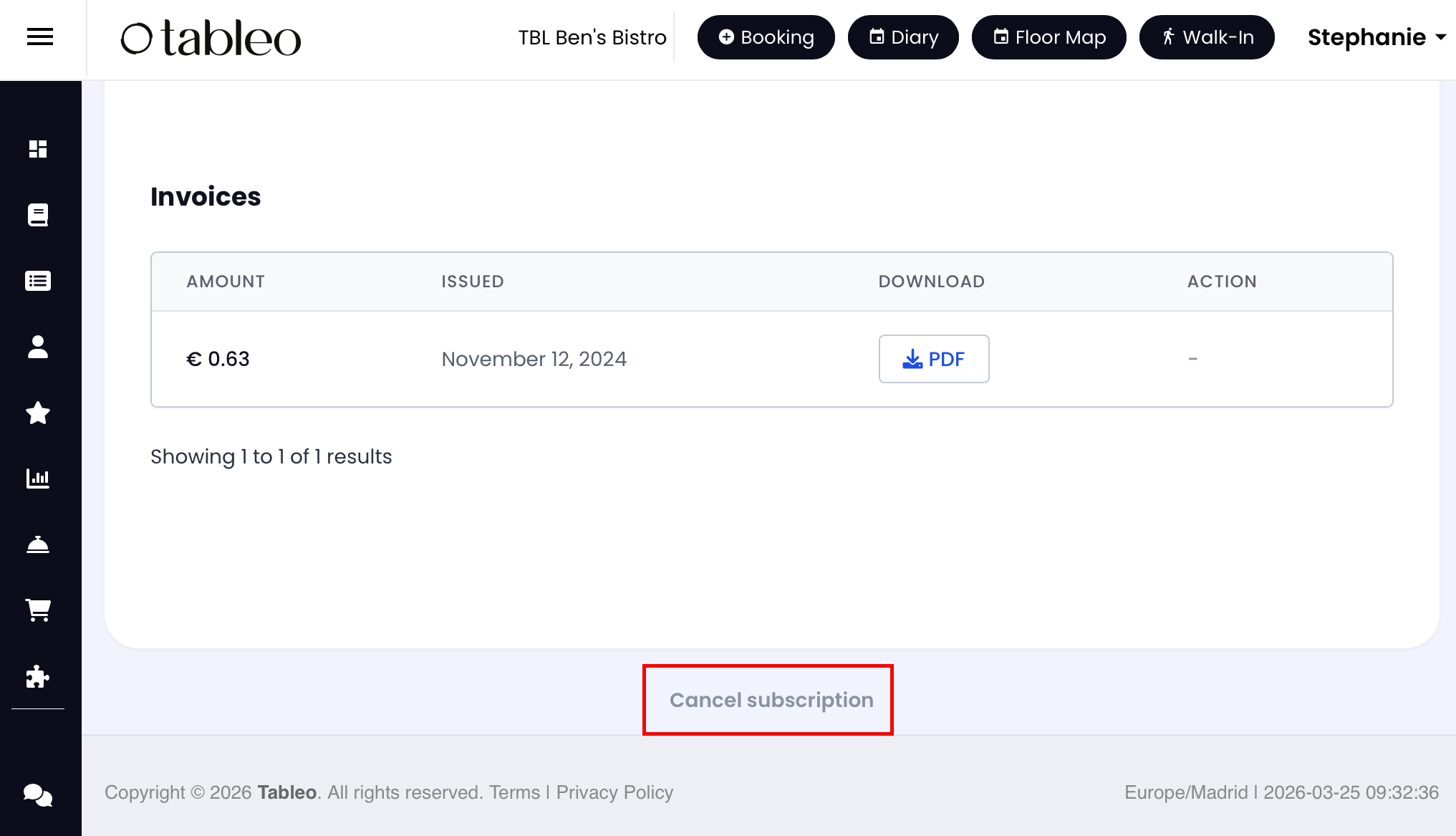
Go to Settings → Account Settings → Billing & Subscription, scroll to the bottom, and click Cancel subscription.
What options will I see?
If you’re on a monthly plan, you can choose:
Pause subscription (recommended)
Downgrade to Freemium
Terminate the account
If you’re on an annual plan, you’ll submit an Annual plan cancellation request and choose a preferred option (see “Annual plans” below).
How do billing, notice period, and the “effective date” work (monthly plans)?
For Terminate and Downgrade to Freemium, a paid 30-day notice period applies.
Effective date logic (as implemented):
Requested at: the moment you submit the request (Europe/Malta timezone)
Notice end: 30 calendar days after the request date
Effective change date: the first billing cycle start (1st of the month) strictly after the notice end date
Example:
Request on 15 Sep → notice ends 15 Oct → effective date is 1 Nov.
October is billed in full (no proration/credits/refunds) because the October billing cycle starts during the notice period.
Do I have to pay when I cancel or downgrade?
Yes — if you choose Terminate or Downgrade to Freemium, you’ll be asked to pay the notice period (1 month fee) upfront as part of the flow.
There are no refunds or credits for partial months.
What does “Pause subscription” mean?
Pausing lets you take a break while keeping your restaurant settings and data saved.
Online bookings are switched off, and your access to the system is restricted during the pause.
The paused plan starts on the 1st of the next month (the 30-day notice period is not applied).
Billing continues at the paused fee (typically € / £ / $ 10/month).
If you decide to reinstate a full account, your settings and data will be restored.
To reinstate the account, email subscriptions@tableo.com.
What does “Downgrade to Freemium” mean?
You keep the account on a free plan (up to 100 covers/month), without premium features.
A paid 30-day notice period applies (see above).
Usage-based charges (SMS, channels, overages, payment processing) will still be invoiced.
If there is no usage for more than 90 days, the account will be automatically closed, and the data will be archived.
What does “Terminate the account” mean?
Termination closes your Tableo account. A paid 30-day notice period applies (see above). You can choose whether to:
Keep online bookings active until the effective termination date, or
Switch off online bookings and close the account immediately.
What happens to my data after the account closes?
You can download/export your data at any time before the account closes — including throughout the notice period and until the effective termination date (or today, if you close immediately).
After the account closes, we archive your data for up to 90 days. During this period, you may request reactivation or a data restore/export, and a one-time € / £ / $ 50 fee applies.
What happens to usage-based charges (SMS, channels, overages, payment processing)?
Usage-based charges will be invoiced after the effective date to settle your final balance.
If you close immediately, you’ll receive an invoice for any usage-based charges incurred to date in the next billing cycle (starting on the 1st of the month).
Will I get a confirmation?
Yes. After submitting, you’ll see a success/confirmation screen and receive a confirmation email with the key details (your selected option and dates).
What if I’m on an annual plan?
Annual plans are prepaid, so you can’t self-cancel immediately. Instead, you submit an Annual plan cancellation request in-app and select a preferred option (e.g., no auto-renewal at the end date, renew at a special price, pause, downgrade, or terminate). An Account Manager will contact you to confirm the selection and the effective dates.
I have questions, problems, or the cancellation flow isn’t working — who do I contact?
Email subscriptions@tableo.com, and our team will help you with anything related to termination, pause, downgrade, effective dates, or billing.
Where do I find detailed Terms and Conditions for Account Cancellation, Pause & Downgrade?
You can find Terms and Conditions as well as Privacy Policy on the Tableo website and in the web app. Please follow this link.
Was this article helpful?
That’s Great!
Thank you for your feedback
Sorry! We couldn't be helpful
Thank you for your feedback
Feedback sent
We appreciate your effort and will try to fix the article